
diff options
| author | Lukaswnd <lukas.windeln@rwth-aachen.de> | 2023-09-07 18:16:14 +0200 |
|---|---|---|
| committer | GitHub <noreply@github.com> | 2023-09-07 18:16:14 +0200 |
| commit | 8555ae1c7905fa883846e440dbe5c04ea4d66687 (patch) | |
| tree | 984b16917c9264e0aa44404cce8f5a7fa3931ab0 /examples | |
| parent | 1bb96e01754b7bdbbeffc6c4367760176b08e4cd (diff) | |
| parent | 66015862ac61c28a3b88bb9738f2c480dfc827c7 (diff) | |
Merge pull request #3 from mrfaptastic/master
uptodate
Diffstat (limited to 'examples')


48 files changed, 1067 insertions, 185 deletions
diff --git a/examples/BouncingSquares/BouncingSquares.ino b/examples/3_DoubleBuffer/3_DoubleBuffer.ino index 6a01225..5a41d67 100644 --- a/examples/BouncingSquares/BouncingSquares.ino +++ b/examples/3_DoubleBuffer/3_DoubleBuffer.ino @@ -1,3 +1,9 @@ +// Example uses the following configuration: mxconfig.double_buff = true; +// to enable double buffering, which means display->flipDMABuffer(); is required. + +// Bounce squares around the screen, doing the re-drawing in the background back-buffer. +// Double buffering is not always required in reality. + #include <ESP32-HUB75-MatrixPanel-I2S-DMA.h> MatrixPanel_I2S_DMA *display = nullptr; @@ -32,14 +38,14 @@ void setup() Serial.println("...Starting Display"); HUB75_I2S_CFG mxconfig; - //mxconfig.double_buff = true; // Turn of double buffer - mxconfig.clkphase = false; + mxconfig.double_buff = true; // <------------- Turn on double buffer + //mxconfig.clkphase = false; // OK, now we can create our matrix object display = new MatrixPanel_I2S_DMA(mxconfig); display->begin(); // setup display with pins as pre-defined in the library - // Create some Squares + // Create some random squares for (int i = 0; i < numSquares; i++) { Squares[i].square_size = random(2,10); @@ -47,8 +53,6 @@ void setup() Squares[i].ypos = random(0, display->height() - Squares[i].square_size); Squares[i].velocityx = static_cast <float> (rand()) / static_cast <float> (RAND_MAX); Squares[i].velocityy = static_cast <float> (rand()) / static_cast <float> (RAND_MAX); - //Squares[i].xdir = (random(2) == 1) ? true:false; - //Squares[i].ydir = (random(2) == 1) ? true:false; int random_num = random(6); Squares[i].colour = colours[random_num]; @@ -57,9 +61,11 @@ void setup() void loop() { - display->flipDMABuffer(); // not used if double buffering isn't enabled - delay(25); - display->clearScreen(); + + display->flipDMABuffer(); // Show the back buffer, set currently output buffer to the back (i.e. no longer being sent to LED panels) + display->clearScreen(); // Now clear the back-buffer + + delay(16); // <----------- Shouldn't see this clearscreen occur as it happens on the back buffer when double buffering is enabled. for (int i = 0; i < numSquares; i++) { diff --git a/examples/3_FM6126Panel/README.md b/examples/3_FM6126Panel/README.md deleted file mode 100644 index 65019e6..0000000 --- a/examples/3_FM6126Panel/README.md +++ /dev/null @@ -1,3 +0,0 @@ -## FM6126 based LED Matrix Panel Reset ## - -FM6216 panels require a special reset sequence before they can be used, check your panel chipset if you have issues. Refer to this example. diff --git a/examples/3_FM6126Panel/3_FM6126Panel.ino b/examples/4_OtherShiftDriverPanel/4_OtherShiftDriverPanel.ino index 3b706e1..e62cecc 100644 --- a/examples/3_FM6126Panel/3_FM6126Panel.ino +++ b/examples/4_OtherShiftDriverPanel/4_OtherShiftDriverPanel.ino @@ -1,19 +1,30 @@ -// How to use this library with a FM6126 panel, thanks goes to: -// https://github.com/hzeller/rpi-rgb-led-matrix/issues/746 +/********************************************************************** + * The library by default supports simple 'shift register' based panels + * with A,B,C,D,E lines to select a specific row, but there are plenty + * of examples of new chips coming on the market that work different. + * + * Please search through the project's issues. For some of these chips + * (you will need to look at the back of your panel to identify), this + * library has workarounds. This can be configured through using one of: + + // mxconfig.driver = HUB75_I2S_CFG::FM6126A; + //mxconfig.driver = HUB75_I2S_CFG::ICN2038S; + //mxconfig.driver = HUB75_I2S_CFG::FM6124; + //mxconfig.driver = HUB75_I2S_CFG::MBI5124; + */ + #include <Arduino.h> #include <ESP32-HUB75-MatrixPanel-I2S-DMA.h> #include <FastLED.h> //////////////////////////////////////////////////////////////////// -// FM6126 support is still experimental // Output resolution and panel chain length configuration #define PANEL_RES_X 64 // Number of pixels wide of each INDIVIDUAL panel module. #define PANEL_RES_Y 32 // Number of pixels tall of each INDIVIDUAL panel module. #define PANEL_CHAIN 1 // Total number of panels chained one to another - // placeholder for the matrix object MatrixPanel_I2S_DMA *dma_display = nullptr; @@ -33,14 +44,6 @@ CRGB ColorFromCurrentPalette(uint8_t index = 0, uint8_t brightness = 255, TBlend } void setup(){ - - /* - The configuration for MatrixPanel_I2S_DMA object is held in HUB75_I2S_CFG structure, - All options has it's predefined default values. So we can create a new structure and redefine only the options we need - - Please refer to the '2_PatternPlasma.ino' example for detailed example of how to use the MatrixPanel_I2S_DMA configuration - if you need to change the pin mappings etc. - */ HUB75_I2S_CFG mxconfig( PANEL_RES_X, // module width @@ -48,7 +51,12 @@ void setup(){ PANEL_CHAIN // Chain length ); - mxconfig.driver = HUB75_I2S_CFG::FM6126A; // in case that we use panels based on FM6126A chip, we can set it here before creating MatrixPanel_I2S_DMA object + // in case that we use panels based on FM6126A chip, we can set it here before creating MatrixPanel_I2S_DMA object + mxconfig.driver = HUB75_I2S_CFG::FM6126A; + //mxconfig.driver = HUB75_I2S_CFG::ICN2038S; + //mxconfig.driver = HUB75_I2S_CFG::FM6124; + //mxconfig.driver = HUB75_I2S_CFG::MBI5124; + // OK, now we can create our matrix object dma_display = new MatrixPanel_I2S_DMA(mxconfig); @@ -99,4 +107,8 @@ void loop(){ fps_timer = millis(); fps = 0; } -}
\ No newline at end of file +} + + +// FM6126 panel , thanks goes to: +// https://github.com/hzeller/rpi-rgb-led-matrix/issues/746 diff --git a/examples/3_FM6126Panel/FM6126A.md b/examples/4_OtherShiftDriverPanel/FM6126A.md index 1641c16..1641c16 100644 --- a/examples/3_FM6126Panel/FM6126A.md +++ b/examples/4_OtherShiftDriverPanel/FM6126A.md diff --git a/examples/4_OtherShiftDriverPanel/README.md b/examples/4_OtherShiftDriverPanel/README.md new file mode 100644 index 0000000..40289cc --- /dev/null +++ b/examples/4_OtherShiftDriverPanel/README.md @@ -0,0 +1,13 @@ +## Ohter driver based LED Matrix Panels ## + +Limited support for other panels exists, but requires this to be passed as a configuration option when using the library. + +These panels require a special reset sequence before they can be used, check your panel chipset if you have issues. Refer to the example. + + +``` + mxconfig.driver = HUB75_I2S_CFG::FM6126A; + mxconfig.driver = HUB75_I2S_CFG::ICN2038S; + mxconfig.driver = HUB75_I2S_CFG::FM6124; + mxconfig.driver = HUB75_I2S_CFG::MBI5124; +``` diff --git a/examples/AnimatedGIFPanel/AnimatedGIFPanel.ino b/examples/AnimatedGIFPanel/AnimatedGIFPanel.ino deleted file mode 100644 index f6986f1..0000000 --- a/examples/AnimatedGIFPanel/AnimatedGIFPanel.ino +++ /dev/null @@ -1,7 +0,0 @@ -// Example sketch which shows how to display a 64x32 animated GIF image stored in FLASH memory -// on a 64x32 LED matrix -// -// Credits: https://github.com/bitbank2/AnimatedGIF/tree/master/examples/ESP32_LEDMatrix_I2S -// - -// Refer to: https://github.com/bitbank2/AnimatedGIF/blob/master/examples/ESP32_LEDMatrix_I2S/ESP32_LEDMatrix_I2S.ino diff --git a/examples/AnimatedGIFPanel_SD/AnimatedGIFPanel_SD.ino b/examples/AnimatedGIFPanel_SD/AnimatedGIFPanel_SD.ino new file mode 100644 index 0000000..9612244 --- /dev/null +++ b/examples/AnimatedGIFPanel_SD/AnimatedGIFPanel_SD.ino @@ -0,0 +1,268 @@ +/********************************************************************* + * AnimatedGif LED Matrix Panel example where the GIFs are + * stored on a SD card connected to the ESP32 using the + * standard GPIO pins used for SD card acces via. SPI. + * + * Put the gifs into a directory called 'gifs' (case sensitive) on + * a FAT32 formatted SDcard. + ********************************************************************/ +#include "FS.h" +#include "SD.h" +#include "SPI.h" +#include <ESP32-HUB75-MatrixPanel-I2S-DMA.h> +#include <AnimatedGIF.h> + +/******************************************************************** + * Pin mapping below is for LOLIN D32 (ESP 32) + * + * Default pin mapping used by this library is NOT compatable with the use of the + * ESP32-Arduino 'SD' card library (there is overlap). As such, some of the pins + * used for the HUB75 panel need to be shifted. + * + * 'SD' card library requires GPIO 23, 18 and 19 + * https://github.com/espressif/arduino-esp32/tree/master/libraries/SD + * + */ + +/* + * Connect the SD card to the following pins: + * + * SD Card | ESP32 + * D2 - + * D3 SS + * CMD MOSI + * VSS GND + * VDD 3.3V + * CLK SCK + * VSS GND + * D0 MISO + * D1 - + */ + +/**** SD Card GPIO mappings ****/ +#define SS_PIN 5 +//#define MOSI_PIN 23 +//#define MISO_PIN 19 +//#define CLK_PIN 18 + + +/**** HUB75 GPIO mapping ****/ +// GPIO 34+ are on the ESP32 are input only!! +// https://randomnerdtutorials.com/esp32-pinout-reference-gpios/ + +#define A_PIN 33 // remap esp32 library default from 23 to 33 +#define B_PIN 32 // remap esp32 library default from 19 to 32 +#define C_PIN 22 // remap esp32 library defaultfrom 5 to 22 + +//#define R1_PIN 25 // library default for the esp32, unchanged +//#define G1_PIN 26 // library default for the esp32, unchanged +//#define B1_PIN 27 // library default for the esp32, unchanged +//#define R2_PIN 14 // library default for the esp32, unchanged +//#define G2_PIN 12 // library default for the esp32, unchanged +//#define B2_PIN 13 // library default for the esp32, unchanged +//#define D_PIN 17 // library default for the esp32, unchanged +//#define E_PIN -1 // IMPORTANT: Change to a valid pin if using a 64x64px panel. + +//#define LAT_PIN 4 // library default for the esp32, unchanged +//#define OE_PIN 15 // library default for the esp32, unchanged +//#define CLK_PIN 16 // library default for the esp32, unchanged + +/*************************************************************** + * HUB 75 LED DMA Matrix Panel Configuration + **************************************************************/ +#define PANEL_RES_X 64 // Number of pixels wide of each INDIVIDUAL panel module. +#define PANEL_RES_Y 32 // Number of pixels tall of each INDIVIDUAL panel module. +#define PANEL_CHAIN 1 // Total number of panels chained one to another + +/**************************************************************/ + +AnimatedGIF gif; +MatrixPanel_I2S_DMA *dma_display = nullptr; + +static int totalFiles = 0; // GIF files count + +static File FSGifFile; // temp gif file holder +static File GifRootFolder; // directory listing + +std::vector<std::string> GifFiles; // GIF files path + +const int maxGifDuration = 30000; // ms, max GIF duration + +#include "gif_functions.hpp" +#include "sdcard_functions.hpp" + + +/**************************************************************/ +void draw_test_patterns(); +int gifPlay( const char* gifPath ) +{ // 0=infinite + + if( ! gif.open( gifPath, GIFOpenFile, GIFCloseFile, GIFReadFile, GIFSeekFile, GIFDraw ) ) { + log_n("Could not open gif %s", gifPath ); + } + + Serial.print("Playing: "); Serial.println(gifPath); + + int frameDelay = 0; // store delay for the last frame + int then = 0; // store overall delay + + while (gif.playFrame(true, &frameDelay)) { + + then += frameDelay; + if( then > maxGifDuration ) { // avoid being trapped in infinite GIF's + //log_w("Broke the GIF loop, max duration exceeded"); + break; + } + } + + gif.close(); + + return then; +} + + +void setup() +{ + Serial.begin(115200); + + // **************************** Setup SD Card access via SPI **************************** + if(!SD.begin(SS_PIN)){ + // bool begin(uint8_t ssPin=SS, SPIClass &spi=SPI, uint32_t frequency=4000000, const char * mountpoint="/sd", uint8_t max_files=5, bool format_if_empty=false); + Serial.println("Card Mount Failed"); + return; + } + uint8_t cardType = SD.cardType(); + + if(cardType == CARD_NONE){ + Serial.println("No SD card attached"); + return; + } + + Serial.print("SD Card Type: "); + if(cardType == CARD_MMC){ + Serial.println("MMC"); + } else if(cardType == CARD_SD){ + Serial.println("SDSC"); + } else if(cardType == CARD_SDHC){ + Serial.println("SDHC"); + } else { + Serial.println("UNKNOWN"); + } + + uint64_t cardSize = SD.cardSize() / (1024 * 1024); + Serial.printf("SD Card Size: %lluMB\n", cardSize); + + //listDir(SD, "/", 1, false); + + Serial.printf("Total space: %lluMB\n", SD.totalBytes() / (1024 * 1024)); + Serial.printf("Used space: %lluMB\n", SD.usedBytes() / (1024 * 1024)); + + + + // **************************** Setup DMA Matrix **************************** + HUB75_I2S_CFG mxconfig( + PANEL_RES_X, // module width + PANEL_RES_Y, // module height + PANEL_CHAIN // Chain length + ); + + // Need to remap these HUB75 DMA pins because the SPI SDCard is using them. + // Otherwise the SD Card will not work. + mxconfig.gpio.a = A_PIN; + mxconfig.gpio.b = B_PIN; + mxconfig.gpio.c = C_PIN; + // mxconfig.gpio.d = D_PIN; + + //mxconfig.clkphase = false; + //mxconfig.driver = HUB75_I2S_CFG::FM6126A; + + // Display Setup + dma_display = new MatrixPanel_I2S_DMA(mxconfig); + + // Allocate memory and start DMA display + if( not dma_display->begin() ) + Serial.println("****** !KABOOM! HUB75 memory allocation failed ***********"); + + dma_display->setBrightness8(128); //0-255 + dma_display->clearScreen(); + + + // **************************** Setup Sketch **************************** + Serial.println("Starting AnimatedGIFs Sketch"); + + // SD CARD STOPS WORKING WITH DMA DISPLAY ENABLED>... + + File root = SD.open("/gifs"); + if(!root){ + Serial.println("Failed to open directory"); + return; + } + + File file = root.openNextFile(); + while(file){ + if(!file.isDirectory()) + { + Serial.print(" FILE: "); + Serial.print(file.name()); + Serial.print(" SIZE: "); + Serial.println(file.size()); + + std::string filename = "/gifs/" + std::string(file.name()); + Serial.println(filename.c_str()); + + GifFiles.push_back( filename ); + // Serial.println("Adding to gif list:" + String(filename)); + totalFiles++; + + } + file = root.openNextFile(); + } + + file.close(); + Serial.printf("Found %d GIFs to play.", totalFiles); + //totalFiles = getGifInventory("/gifs"); + + + + // This is important - Set the right endianness. + gif.begin(LITTLE_ENDIAN_PIXELS); + +} + +void loop(){ + + // Iterate over a vector using range based for loop + for(auto & elem : GifFiles) + { + gifPlay( elem.c_str() ); + gif.reset(); + delay(500); + } + +} + +void draw_test_patterns() +{ + // fix the screen with green + dma_display->fillRect(0, 0, dma_display->width(), dma_display->height(), dma_display->color444(0, 15, 0)); + delay(500); + + // draw a box in yellow + dma_display->drawRect(0, 0, dma_display->width(), dma_display->height(), dma_display->color444(15, 15, 0)); + delay(500); + + // draw an 'X' in red + dma_display->drawLine(0, 0, dma_display->width()-1, dma_display->height()-1, dma_display->color444(15, 0, 0)); + dma_display->drawLine(dma_display->width()-1, 0, 0, dma_display->height()-1, dma_display->color444(15, 0, 0)); + delay(500); + + // draw a blue circle + dma_display->drawCircle(10, 10, 10, dma_display->color444(0, 0, 15)); + delay(500); + + // fill a violet circle + dma_display->fillCircle(40, 21, 10, dma_display->color444(15, 0, 15)); + delay(500); + delay(1000); + +} diff --git a/examples/AnimatedGIFPanel_SD/Readme.md b/examples/AnimatedGIFPanel_SD/Readme.md new file mode 100644 index 0000000..6f9f06a --- /dev/null +++ b/examples/AnimatedGIFPanel_SD/Readme.md @@ -0,0 +1,15 @@ +# ESP32-HUB75-MatrixPanel-DMA SDCard example + +A very basic example using the 'Animated GIF' library by Larry Bank + the SD / File system library provided for Arduino by Espressif. + +Some default HUB75 pins need to be remapped to accomodate for the SD Card. + + + +## How to use it? + +1. Format a SD Card with FAT32 file system (default setting) +2. Create a directory called 'gifs' +3. Drop your gifs in there. The resolution of the GIFS must match that of the display. + + diff --git a/examples/AnimatedGIFPanel_SD/esp32_sdcard.jpg b/examples/AnimatedGIFPanel_SD/esp32_sdcard.jpg Binary files differnew file mode 100644 index 0000000..4a4441d --- /dev/null +++ b/examples/AnimatedGIFPanel_SD/esp32_sdcard.jpg diff --git a/examples/AnimatedGIFPanel_SD/gif_functions.hpp b/examples/AnimatedGIFPanel_SD/gif_functions.hpp new file mode 100644 index 0000000..7a16a63 --- /dev/null +++ b/examples/AnimatedGIFPanel_SD/gif_functions.hpp @@ -0,0 +1,132 @@ + +// Code copied from AnimatedGIF examples + +#ifndef M5STACK_SD + // for custom ESP32 builds + #define M5STACK_SD SD +#endif + + +static void * GIFOpenFile(const char *fname, int32_t *pSize) +{ + //log_d("GIFOpenFile( %s )\n", fname ); + FSGifFile = M5STACK_SD.open(fname); + if (FSGifFile) { + *pSize = FSGifFile.size(); + return (void *)&FSGifFile; + } + return NULL; +} + + +static void GIFCloseFile(void *pHandle) +{ + File *f = static_cast<File *>(pHandle); + if (f != NULL) + f->close(); +} + + +static int32_t GIFReadFile(GIFFILE *pFile, uint8_t *pBuf, int32_t iLen) +{ + int32_t iBytesRead; + iBytesRead = iLen; + File *f = static_cast<File *>(pFile->fHandle); + // Note: If you read a file all the way to the last byte, seek() stops working + if ((pFile->iSize - pFile->iPos) < iLen) + iBytesRead = pFile->iSize - pFile->iPos - 1; // <-- ugly work-around + if (iBytesRead <= 0) + return 0; + iBytesRead = (int32_t)f->read(pBuf, iBytesRead); + pFile->iPos = f->position(); + return iBytesRead; +} + + +static int32_t GIFSeekFile(GIFFILE *pFile, int32_t iPosition) +{ + int i = micros(); + File *f = static_cast<File *>(pFile->fHandle); + f->seek(iPosition); + pFile->iPos = (int32_t)f->position(); + i = micros() - i; + //log_d("Seek time = %d us\n", i); + return pFile->iPos; +} + + +// Draw a line of image directly on the LCD +void GIFDraw(GIFDRAW *pDraw) +{ + uint8_t *s; + uint16_t *d, *usPalette, usTemp[320]; + int x, y, iWidth; + + iWidth = pDraw->iWidth; + if (iWidth > PANEL_RES_X) + iWidth = PANEL_RES_X; + usPalette = pDraw->pPalette; + y = pDraw->iY + pDraw->y; // current line + + s = pDraw->pPixels; + if (pDraw->ucDisposalMethod == 2) {// restore to background color + for (x=0; x<iWidth; x++) { + if (s[x] == pDraw->ucTransparent) + s[x] = pDraw->ucBackground; + } + pDraw->ucHasTransparency = 0; + } + // Apply the new pixels to the main image + if (pDraw->ucHasTransparency) { // if transparency used + uint8_t *pEnd, c, ucTransparent = pDraw->ucTransparent; + int x, iCount; + pEnd = s + iWidth; + x = 0; + iCount = 0; // count non-transparent pixels + while(x < iWidth) { + c = ucTransparent-1; + d = usTemp; + while (c != ucTransparent && s < pEnd) { + c = *s++; + if (c == ucTransparent) { // done, stop + s--; // back up to treat it like transparent + } else { // opaque + *d++ = usPalette[c]; + iCount++; + } + } // while looking for opaque pixels + if (iCount) { // any opaque pixels? + for(int xOffset = 0; xOffset < iCount; xOffset++ ){ + dma_display->drawPixel(x + xOffset, y, usTemp[xOffset]); // 565 Color Format + } + x += iCount; + iCount = 0; + } + // no, look for a run of transparent pixels + c = ucTransparent; + while (c == ucTransparent && s < pEnd) { + c = *s++; + if (c == ucTransparent) + iCount++; + else + s--; + } + if (iCount) { + x += iCount; // skip these + iCount = 0; + } + } + } else { + s = pDraw->pPixels; + // Translate the 8-bit pixels through the RGB565 palette (already byte reversed) + for (x=0; x<iWidth; x++) + dma_display->drawPixel(x, y, usPalette[*s++]); // color 565 + /* + usTemp[x] = usPalette[*s++]; + + for (x=0; x<pDraw->iWidth; x++) { + dma_display->drawPixel(x, y, usTemp[*s++]); // color 565 + } */ + + } +} /* GIFDraw() */ diff --git a/examples/AnimatedGIFPanel/data/gifs/cartoon.gif b/examples/AnimatedGIFPanel_SD/gifs/cartoon.gif Binary files differindex 32a0e25..32a0e25 100644 --- a/examples/AnimatedGIFPanel/data/gifs/cartoon.gif +++ b/examples/AnimatedGIFPanel_SD/gifs/cartoon.gif diff --git a/examples/AnimatedGIFPanel/data/gifs/ezgif.com-pacmn.gif b/examples/AnimatedGIFPanel_SD/gifs/ezgif.com-pacmn.gif Binary files differindex 0a219a4..0a219a4 100644 --- a/examples/AnimatedGIFPanel/data/gifs/ezgif.com-pacmn.gif +++ b/examples/AnimatedGIFPanel_SD/gifs/ezgif.com-pacmn.gif diff --git a/examples/AnimatedGIFPanel/data/gifs/loading.io-64x32px.gif b/examples/AnimatedGIFPanel_SD/gifs/loading.io-64x32px.gif Binary files differindex 342f8ae..342f8ae 100644 --- a/examples/AnimatedGIFPanel/data/gifs/loading.io-64x32px.gif +++ b/examples/AnimatedGIFPanel_SD/gifs/loading.io-64x32px.gif diff --git a/examples/AnimatedGIFPanel/data/gifs/matrix-spin.gif b/examples/AnimatedGIFPanel_SD/gifs/matrix-spin.gif Binary files differindex 7925d68..7925d68 100644 --- a/examples/AnimatedGIFPanel/data/gifs/matrix-spin.gif +++ b/examples/AnimatedGIFPanel_SD/gifs/matrix-spin.gif diff --git a/examples/AnimatedGIFPanel/data/gifs/parasite1.gif b/examples/AnimatedGIFPanel_SD/gifs/parasite1.gif Binary files differindex 8b8b67a..8b8b67a 100644 --- a/examples/AnimatedGIFPanel/data/gifs/parasite1.gif +++ b/examples/AnimatedGIFPanel_SD/gifs/parasite1.gif diff --git a/examples/AnimatedGIFPanel/data/gifs/parasite2.gif b/examples/AnimatedGIFPanel_SD/gifs/parasite2.gif Binary files differindex 60d03c7..60d03c7 100644 --- a/examples/AnimatedGIFPanel/data/gifs/parasite2.gif +++ b/examples/AnimatedGIFPanel_SD/gifs/parasite2.gif diff --git a/examples/AnimatedGIFPanel/data/gifs/shock-gs.gif b/examples/AnimatedGIFPanel_SD/gifs/shock-gs.gif Binary files differindex 1d023d9..1d023d9 100644 --- a/examples/AnimatedGIFPanel/data/gifs/shock-gs.gif +++ b/examples/AnimatedGIFPanel_SD/gifs/shock-gs.gif diff --git a/examples/AnimatedGIFPanel_SD/sdcard_functions.hpp b/examples/AnimatedGIFPanel_SD/sdcard_functions.hpp new file mode 100644 index 0000000..51ff5b1 --- /dev/null +++ b/examples/AnimatedGIFPanel_SD/sdcard_functions.hpp @@ -0,0 +1,102 @@ +/************************ SD Card Code ************************/ +// As per: https://github.com/espressif/arduino-esp32/tree/master/libraries/SD/examples/SD_Test + + + +void listDir(fs::FS &fs, const char * dirname, uint8_t levels, bool add_to_gif_list = false){ + Serial.printf("Listing directory: %s\n", dirname); + + File root = fs.open(dirname); + if(!root){ + Serial.println("Failed to open directory"); + return; + } + if(!root.isDirectory()){ + Serial.println("Not a directory"); + return; + } + + File file = root.openNextFile(); + while(file){ + if(file.isDirectory()){ + Serial.print(" DIR : "); + Serial.println(file.name()); + if(levels){ + listDir(fs, file.path(), levels -1, false); + } + } else { + Serial.print(" FILE: "); + Serial.print(file.name()); + Serial.print(" SIZE: "); + Serial.println(file.size()); + + if (add_to_gif_list && levels == 0) + { + GifFiles.push_back( std::string(dirname) + file.name() ); + Serial.println("Adding to gif list:" + String(dirname) +"/" + file.name()); + totalFiles++; + } + } + file = root.openNextFile(); + } + + file.close(); +} + +void readFile(fs::FS &fs, const char * path){ + Serial.printf("Reading file: %s\n", path); + + File file = fs.open(path); + if(!file){ + Serial.println("Failed to open file for reading"); + return; + } + + Serial.print("Read from file: "); + while(file.available()){ + Serial.write(file.read()); + } + file.close(); +} + +void testFileIO(fs::FS &fs, const char * path){ + File file = fs.open(path); + static uint8_t buf[512]; + size_t len = 0; + uint32_t start = millis(); + uint32_t end = start; + if(file){ + len = file.size(); + size_t flen = len; + start = millis(); + while(len){ + size_t toRead = len; + if(toRead > 512){ + toRead = 512; + } + file.read(buf, toRead); + len -= toRead; + } + end = millis() - start; + Serial.printf("%u bytes read for %u ms\n", flen, end); + file.close(); + } else { + Serial.println("Failed to open file for reading"); + } + + + file = fs.open(path, FILE_WRITE); + if(!file){ + Serial.println("Failed to open file for writing"); + return; + } + + size_t i; + start = millis(); + for(i=0; i<2048; i++){ + file.write(buf, 512); + } + end = millis() - start; + Serial.printf("%u bytes written for %u ms\n", 2048 * 512, end); + file.close(); +}
\ No newline at end of file diff --git a/examples/AnimatedGIFPanel_SPIFFS/AnimatedGIFPanel_SPIFFS.ino b/examples/AnimatedGIFPanel_SPIFFS/AnimatedGIFPanel_SPIFFS.ino new file mode 100644 index 0000000..9d6d182 --- /dev/null +++ b/examples/AnimatedGIFPanel_SPIFFS/AnimatedGIFPanel_SPIFFS.ino @@ -0,0 +1,290 @@ +// Example sketch which shows how to display a 64x32 animated GIF image stored in FLASH memory +// on a 64x32 LED matrix +// +// Credits: https://github.com/bitbank2/AnimatedGIF/tree/master/examples/ESP32_LEDMatrix_I2S +// + +/* INSTRUCTIONS + * + * 1. First Run the 'ESP32 Sketch Data Upload Tool' in Arduino from the 'Tools' Menu. + * - If you don't know what this is or see it as an option, then read this: + * https://github.com/me-no-dev/arduino-esp32fs-plugin + * - This tool will upload the contents of the data/ directory in the sketch folder onto + * the ESP32 itself. + * + * 2. You can drop any animated GIF you want in there, but keep it to the resolution of the + * MATRIX you're displaying to. To resize a gif, use this online website: https://ezgif.com/ + * + * 3. Have fun. + */ + +#define FILESYSTEM SPIFFS +#include <SPIFFS.h> +#include <AnimatedGIF.h> +#include <ESP32-HUB75-MatrixPanel-I2S-DMA.h> + +// ---------------------------- + +/* + * Below is an is the 'legacy' way of initialising the MatrixPanel_I2S_DMA class. + * i.e. MATRIX_WIDTH and MATRIX_HEIGHT are modified by compile-time directives. + * By default the library assumes a single 64x32 pixel panel is connected. + * + * Refer to the example '2_PatternPlasma' on the new / correct way to setup this library + * for different resolutions / panel chain lengths within the sketch 'setup()'. + * + */ + +#define PANEL_RES_X 64 // Number of pixels wide of each INDIVIDUAL panel module. +#define PANEL_RES_Y 32 // Number of pixels tall of each INDIVIDUAL panel module. +#define PANEL_CHAIN 1 // Total number of panels chained one to another + +//MatrixPanel_I2S_DMA dma_display; +MatrixPanel_I2S_DMA *dma_display = nullptr; + +uint16_t myBLACK = dma_display->color565(0, 0, 0); +uint16_t myWHITE = dma_display->color565(255, 255, 255); +uint16_t myRED = dma_display->color565(255, 0, 0); +uint16_t myGREEN = dma_display->color565(0, 255, 0); +uint16_t myBLUE = dma_display->color565(0, 0, 255); + + +AnimatedGIF gif; +File f; +int x_offset, y_offset; + + + +// Draw a line of image directly on the LED Matrix +void GIFDraw(GIFDRAW *pDraw) +{ + uint8_t *s; + uint16_t *d, *usPalette, usTemp[320]; + int x, y, iWidth; + + iWidth = pDraw->iWidth; + if (iWidth > MATRIX_WIDTH) + iWidth = MATRIX_WIDTH; + + usPalette = pDraw->pPalette; + y = pDraw->iY + pDraw->y; // current line + + s = pDraw->pPixels; + if (pDraw->ucDisposalMethod == 2) // restore to background color + { + for (x=0; x<iWidth; x++) + { + if (s[x] == pDraw->ucTransparent) + s[x] = pDraw->ucBackground; + } + pDraw->ucHasTransparency = 0; + } + // Apply the new pixels to the main image + if (pDraw->ucHasTransparency) // if transparency used + { + uint8_t *pEnd, c, ucTransparent = pDraw->ucTransparent; + int x, iCount; + pEnd = s + pDraw->iWidth; + x = 0; + iCount = 0; // count non-transparent pixels + while(x < pDraw->iWidth) + { + c = ucTransparent-1; + d = usTemp; + while (c != ucTransparent && s < pEnd) + { + c = *s++; + if (c == ucTransparent) // done, stop + { + s--; // back up to treat it like transparent + } + else // opaque + { + *d++ = usPalette[c]; + iCount++; + } + } // while looking for opaque pixels + if (iCount) // any opaque pixels? + { + for(int xOffset = 0; xOffset < iCount; xOffset++ ){ + dma_display->drawPixel(x + xOffset, y, usTemp[xOffset]); // 565 Color Format + } + x += iCount; + iCount = 0; + } + // no, look for a run of transparent pixels + c = ucTransparent; + while (c == ucTransparent && s < pEnd) + { + c = *s++; + if (c == ucTransparent) + iCount++; + else + s--; + } + if (iCount) + { + x += iCount; // skip these + iCount = 0; + } + } + } + else // does not have transparency + { + s = pDraw->pPixels; + // Translate the 8-bit pixels through the RGB565 palette (already byte reversed) + for (x=0; x<pDraw->iWidth; x++) + { + dma_display->drawPixel(x, y, usPalette[*s++]); // color 565 + } + } +} /* GIFDraw() */ + + +void * GIFOpenFile(const char *fname, int32_t *pSize) +{ + Serial.print("Playing gif: "); + Serial.println(fname); + f = FILESYSTEM.open(fname); + if (f) + { + *pSize = f.size(); + return (void *)&f; + } + return NULL; +} /* GIFOpenFile() */ + +void GIFCloseFile(void *pHandle) +{ + File *f = static_cast<File *>(pHandle); + if (f != NULL) + f->close(); +} /* GIFCloseFile() */ + +int32_t GIFReadFile(GIFFILE *pFile, uint8_t *pBuf, int32_t iLen) +{ + int32_t iBytesRead; + iBytesRead = iLen; + File *f = static_cast<File *>(pFile->fHandle); + // Note: If you read a file all the way to the last byte, seek() stops working + if ((pFile->iSize - pFile->iPos) < iLen) + iBytesRead = pFile->iSize - pFile->iPos - 1; // <-- ugly work-around + if (iBytesRead <= 0) + return 0; + iBytesRead = (int32_t)f->read(pBuf, iBytesRead); + pFile->iPos = f->position(); + return iBytesRead; +} /* GIFReadFile() */ + +int32_t GIFSeekFile(GIFFILE *pFile, int32_t iPosition) +{ + int i = micros(); + File *f = static_cast<File *>(pFile->fHandle); + f->seek(iPosition); + pFile->iPos = (int32_t)f->position(); + i = micros() - i; +// Serial.printf("Seek time = %d us\n", i); + return pFile->iPos; +} /* GIFSeekFile() */ + +unsigned long start_tick = 0; + +void ShowGIF(char *name) +{ + start_tick = millis(); + + if (gif.open(name, GIFOpenFile, GIFCloseFile, GIFReadFile, GIFSeekFile, GIFDraw)) + { + x_offset = (MATRIX_WIDTH - gif.getCanvasWidth())/2; + if (x_offset < 0) x_offset = 0; + y_offset = (MATRIX_HEIGHT - gif.getCanvasHeight())/2; + if (y_offset < 0) y_offset = 0; + Serial.printf("Successfully opened GIF; Canvas size = %d x %d\n", gif.getCanvasWidth(), gif.getCanvasHeight()); + Serial.flush(); + while (gif.playFrame(true, NULL)) + { + if ( (millis() - start_tick) > 8000) { // we'll get bored after about 8 seconds of the same looping gif + break; + } + } + gif.close(); + } + +} /* ShowGIF() */ + + + +/************************* Arduino Sketch Setup and Loop() *******************************/ +void setup() { + Serial.begin(115200); + delay(1000); + + HUB75_I2S_CFG mxconfig( + PANEL_RES_X, // module width + PANEL_RES_Y, // module height + PANEL_CHAIN // Chain length + ); + + // mxconfig.gpio.e = 18; + // mxconfig.clkphase = false; + //mxconfig.driver = HUB75_I2S_CFG::FM6126A; + + // Display Setup + dma_display = new MatrixPanel_I2S_DMA(mxconfig); + dma_display->begin(); + dma_display->setBrightness8(128); //0-255 + dma_display->clearScreen(); + dma_display->fillScreen(myWHITE); + + Serial.println("Starting AnimatedGIFs Sketch"); + + // Start filesystem + Serial.println(" * Loading SPIFFS"); + if(!SPIFFS.begin()){ + Serial.println("SPIFFS Mount Failed"); + } + + dma_display->begin(); + + /* all other pixel drawing functions can only be called after .begin() */ + dma_display->fillScreen(dma_display->color565(0, 0, 0)); + gif.begin(LITTLE_ENDIAN_PIXELS); + +} + +String gifDir = "/gifs"; // play all GIFs in this directory on the SD card +char filePath[256] = { 0 }; +File root, gifFile; + +void loop() +{ + while (1) // run forever + { + + root = FILESYSTEM.open(gifDir); + if (root) + { + gifFile = root.openNextFile(); + while (gifFile) + { + if (!gifFile.isDirectory()) // play it + { + + // C-strings... urghh... + memset(filePath, 0x0, sizeof(filePath)); + strcpy(filePath, gifFile.path()); + + // Show it. + ShowGIF(filePath); + + } + gifFile.close(); + gifFile = root.openNextFile(); + } + root.close(); + } // root + + delay(1000); // pause before restarting + + } // while +}
\ No newline at end of file diff --git a/examples/AnimatedGIFPanel/README.md b/examples/AnimatedGIFPanel_SPIFFS/README.md index 63ff899..63ff899 100644 --- a/examples/AnimatedGIFPanel/README.md +++ b/examples/AnimatedGIFPanel_SPIFFS/README.md diff --git a/examples/AnimatedGIFPanel_SPIFFS/data/gifs/cartoon.gif b/examples/AnimatedGIFPanel_SPIFFS/data/gifs/cartoon.gif Binary files differnew file mode 100644 index 0000000..32a0e25 --- /dev/null +++ b/examples/AnimatedGIFPanel_SPIFFS/data/gifs/cartoon.gif diff --git a/examples/AnimatedGIFPanel_SPIFFS/data/gifs/ezgif.com-pacmn.gif b/examples/AnimatedGIFPanel_SPIFFS/data/gifs/ezgif.com-pacmn.gif Binary files differnew file mode 100644 index 0000000..0a219a4 --- /dev/null +++ b/examples/AnimatedGIFPanel_SPIFFS/data/gifs/ezgif.com-pacmn.gif diff --git a/examples/AnimatedGIFPanel_SPIFFS/data/gifs/loading.io-64x32px.gif b/examples/AnimatedGIFPanel_SPIFFS/data/gifs/loading.io-64x32px.gif Binary files differnew file mode 100644 index 0000000..342f8ae --- /dev/null +++ b/examples/AnimatedGIFPanel_SPIFFS/data/gifs/loading.io-64x32px.gif diff --git a/examples/AnimatedGIFPanel_SPIFFS/data/gifs/matrix-spin.gif b/examples/AnimatedGIFPanel_SPIFFS/data/gifs/matrix-spin.gif Binary files differnew file mode 100644 index 0000000..7925d68 --- /dev/null +++ b/examples/AnimatedGIFPanel_SPIFFS/data/gifs/matrix-spin.gif diff --git a/examples/AnimatedGIFPanel_SPIFFS/data/gifs/parasite1.gif b/examples/AnimatedGIFPanel_SPIFFS/data/gifs/parasite1.gif Binary files differnew file mode 100644 index 0000000..8b8b67a --- /dev/null +++ b/examples/AnimatedGIFPanel_SPIFFS/data/gifs/parasite1.gif diff --git a/examples/AnimatedGIFPanel_SPIFFS/data/gifs/parasite2.gif b/examples/AnimatedGIFPanel_SPIFFS/data/gifs/parasite2.gif Binary files differnew file mode 100644 index 0000000..60d03c7 --- /dev/null +++ b/examples/AnimatedGIFPanel_SPIFFS/data/gifs/parasite2.gif diff --git a/examples/AnimatedGIFPanel_SPIFFS/data/gifs/shock-gs.gif b/examples/AnimatedGIFPanel_SPIFFS/data/gifs/shock-gs.gif Binary files differnew file mode 100644 index 0000000..1d023d9 --- /dev/null +++ b/examples/AnimatedGIFPanel_SPIFFS/data/gifs/shock-gs.gif diff --git a/examples/ChainedPanels/ChainedPanels.ino b/examples/ChainedPanels/ChainedPanels.ino index 33379c6..1343d9b 100644 --- a/examples/ChainedPanels/ChainedPanels.ino +++ b/examples/ChainedPanels/ChainedPanels.ino @@ -1,158 +1,67 @@ /****************************************************************************** - ----------- - Steps to use - ----------- + ------------------------------------------------------------------------- + Steps to create a virtual display made up of a chain of panels in a grid + ------------------------------------------------------------------------- - 1) In the sketch (i.e. this example): + Read the documentation! + https://github.com/mrfaptastic/ESP32-HUB75-MatrixPanel-DMA/tree/master/examples/ChainedPanels + + tl/dr: - - Set values for NUM_ROWS, NUM_COLS, PANEL_RES_X, PANEL_RES_Y, PANEL_CHAIN. - There are comments beside them explaining what they are in more detail. + - Set values for NUM_ROWS, NUM_COLS, PANEL_RES_X, PANEL_RES_Y, PANEL_CHAIN_TYPE. + - Other than where the matrix is defined and matrix.begin in the setup, you should now be using the virtual display for everything (drawing pixels, writing text etc). You can do a find and replace of all calls if it's an existing sketch (just make sure you don't replace the definition and the matrix.begin) + - If the sketch makes use of MATRIX_HEIGHT or MATRIX_WIDTH, these will need to be replaced with the width and height of your virtual screen. Either make new defines and use that, or you can use virtualDisp.width() or .height() - Thanks to: - - * Brian Lough for the original example as raised in this issue: - https://github.com/mrfaptastic/ESP32-HUB75-MatrixPanel-I2S-DMA/issues/26 - - YouTube: https://www.youtube.com/brianlough - Tindie: https://www.tindie.com/stores/brianlough/ - Twitter: https://twitter.com/witnessmenow - - * Galaxy-Man for the kind donation of panels make/test that this is possible: - https://github.com/Galaxy-Man - *****************************************************************************/ +// 1) Include key virtual display library + #include <ESP32-VirtualMatrixPanel-I2S-DMA.h> - - /****************************************************************************** - * VIRTUAL DISPLAY / MATRIX PANEL CHAINING CONFIGURATION - * - * Note 1: If chaining from the top right to the left, and then S curving down - * then serpentine_chain = true and top_down_chain = true - * (these being the last two parameters of the virtualDisp(...) constructor. - * - * Note 2: If chaining starts from the bottom up, then top_down_chain = false. - * - * Note 3: By default, this library has serpentine_chain = true, that is, every - * second row has the panels 'upside down' (rotated 180), so the output - * pin of the row above is right above the input connector of the next - * row. - - Example 1 panel chaining: - +-----------------+-----------------+-------------------+ - | 64x32px PANEL 3 | 64x32px PANEL 2 | 64x32px PANEL 1 | - | ------------ <-------- | ------------xx | - | [OUT] | [IN] | [OUT] [IN] | [OUT] [ESP IN] | - +--------|--------+-----------------+-------------------+ - | 64x32px|PANEL 4 | 64x32px PANEL 5 | 64x32px PANEL 6 | - | \|/ ----------> | -----> | - | [IN] [OUT] | [IN] [OUT] | [IN] [OUT] | - +-----------------+-----------------+-------------------+ - - Example 1 configuration: - - #define PANEL_RES_X 64 // Number of pixels wide of each INDIVIDUAL panel module. - #define PANEL_RES_Y 32 // Number of pixels tall of each INDIVIDUAL panel module. - - #define NUM_ROWS 2 // Number of rows of chained INDIVIDUAL PANELS - #define NUM_COLS 3 // Number of INDIVIDUAL PANELS per ROW - - virtualDisp(dma_display, NUM_ROWS, NUM_COLS, PANEL_RES_X, PANEL_RES_Y, true, true); - - = 192x64 px virtual display, with the top left of panel 3 being pixel co-ord (0,0) - - ========================================================== - - Example 2 panel chaining: - - +-------------------+ - | 64x32px PANEL 1 | - | ----------------- | - | [OUT] [ESP IN] | - +-------------------+ - | 64x32px PANEL 2 | - | | - | [IN] [OUT] | - +-------------------+ - | 64x32px PANEL 3 | - | | - | [OUT] [IN] | - +-------------------+ - | 64x32px PANEL 4 | - | | - | [IN] [OUT] | - +-------------------+ - - Example 2 configuration: - - #define PANEL_RES_X 64 // Number of pixels wide of each INDIVIDUAL panel module. - #define PANEL_RES_Y 32 // Number of pixels tall of each INDIVIDUAL panel module. - - #define NUM_ROWS 4 // Number of rows of chained INDIVIDUAL PANELS - #define NUM_COLS 1 // Number of INDIVIDUAL PANELS per ROW - - virtualDisp(dma_display, NUM_ROWS, NUM_COLS, PANEL_RES_X, PANEL_RES_Y, true, true); - - virtualDisp(dma_display, NUM_ROWS, NUM_COLS, PANEL_RES_X, PANEL_RES_Y, true, true); - - = 128x64 px virtual display, with the top left of panel 1 being pixel co-ord (0,0) - - ========================================================== - - Example 3 panel chaining (bottom up): - - +-----------------+-----------------+ - | 64x32px PANEL 4 | 64x32px PANEL 3 | - | <---------- | - | [OUT] [IN] | [OUT] [in] | - +-----------------+-----------------+ - | 64x32px PANEL 1 | 64x32px PANEL 2 | - | ----------> | - | [ESP IN] [OUT] | [IN] [OUT] | - +-----------------+-----------------+ - - Example 1 configuration: - +// 2) Set configuration #define PANEL_RES_X 64 // Number of pixels wide of each INDIVIDUAL panel module. #define PANEL_RES_Y 32 // Number of pixels tall of each INDIVIDUAL panel module. #define NUM_ROWS 2 // Number of rows of chained INDIVIDUAL PANELS #define NUM_COLS 2 // Number of INDIVIDUAL PANELS per ROW + #define PANEL_CHAIN NUM_ROWS*NUM_COLS // total number of panels chained one to another - virtualDisp(dma_display, NUM_ROWS, NUM_COLS, PANEL_RES_X, PANEL_RES_Y, true, false); - - = 128x64 px virtual display, with the top left of panel 4 being pixel co-ord (0,0) - -*/ - + /* Configure the serpetine chaining approach. Options are: + CHAIN_TOP_LEFT_DOWN + CHAIN_TOP_RIGHT_DOWN + CHAIN_BOTTOM_LEFT_UP + CHAIN_BOTTOM_RIGHT_UP + The location (i.e. 'TOP_LEFT', 'BOTTOM_RIGHT') etc. refers to the starting point where + the ESP32 is located, and how the chain of panels will 'roll out' from there. + In this example we're using 'CHAIN_BOTTOM_LEFT_UP' which would look like this in the real world: -#define PANEL_RES_X 64 // Number of pixels wide of each INDIVIDUAL panel module. -#define PANEL_RES_Y 32 // Number of pixels tall of each INDIVIDUAL panel module. + Chain of 4 x 64x32 panels with the ESP at the BOTTOM_LEFT: -#define NUM_ROWS 2 // Number of rows of chained INDIVIDUAL PANELS -#define NUM_COLS 2 // Number of INDIVIDUAL PANELS per ROW -#define PANEL_CHAIN NUM_ROWS*NUM_COLS // total number of panels chained one to another + +---------+---------+ + | 4 | 3 | + | | | + +---------+---------+ + | 1 | 2 | + | (ESP) | | + +---------+---------+ -// Change this to your needs, for details on VirtualPanel pls read the PDF! -#define SERPENT true -#define TOPDOWN false + */ + #define VIRTUAL_MATRIX_CHAIN_TYPE CHAIN_BOTTOM_LEFT_UP -// library includes -#include <ESP32-VirtualMatrixPanel-I2S-DMA.h> +// 3) Create the runtime objects to use -// placeholder for the matrix object -MatrixPanel_I2S_DMA *dma_display = nullptr; + // placeholder for the matrix object + MatrixPanel_I2S_DMA *dma_display = nullptr; -// placeholder for the virtual display object -VirtualMatrixPanel *virtualDisp = nullptr; + // placeholder for the virtual display object + VirtualMatrixPanel *virtualDisp = nullptr; /****************************************************************************** @@ -203,37 +112,58 @@ void setup() { Serial.println("****** !KABOOM! I2S memory allocation failed ***********"); // create VirtualDisplay object based on our newly created dma_display object - virtualDisp = new VirtualMatrixPanel((*dma_display), NUM_ROWS, NUM_COLS, PANEL_RES_X, PANEL_RES_Y, SERPENT, TOPDOWN); + virtualDisp = new VirtualMatrixPanel((*dma_display), NUM_ROWS, NUM_COLS, PANEL_RES_X, PANEL_RES_Y, VIRTUAL_MATRIX_CHAIN_TYPE); // So far so good, so continue virtualDisp->fillScreen(virtualDisp->color444(0, 0, 0)); virtualDisp->drawDisplayTest(); // draw text numbering on each screen to check connectivity - delay(3000); + // delay(1000); - Serial.println("Chain of 64x32 panels for this example:"); - Serial.println("+--------+---------+"); - Serial.println("| 4 | 3 |"); - Serial.println("| | |"); - Serial.println("+--------+---------+"); - Serial.println("| 1 | 2 |"); - Serial.println("| (ESP) | |"); - Serial.println("+--------+---------+"); + Serial.println("Chain of 4x 64x32 panels for this example:"); + Serial.println("+---------+---------+"); + Serial.println("| 4 | 3 |"); + Serial.println("| | |"); + Serial.println("+---------+---------+"); + Serial.println("| 1 | 2 |"); + Serial.println("| (ESP32) | |"); + Serial.println("+---------+---------+"); + // draw blue text virtualDisp->setFont(&FreeSansBold12pt7b); virtualDisp->setTextColor(virtualDisp->color565(0, 0, 255)); - virtualDisp->setTextSize(2); - virtualDisp->setCursor(10, virtualDisp->height()-20); - + virtualDisp->setTextSize(3); + virtualDisp->setCursor(0, virtualDisp->height()- ((virtualDisp->height()-45)/2)); + virtualDisp->print("ABCD"); + // Red text inside red rect (2 pix in from edge) - virtualDisp->print("1234"); virtualDisp->drawRect(1,1, virtualDisp->width()-2, virtualDisp->height()-2, virtualDisp->color565(255,0,0)); // White line from top left to bottom right virtualDisp->drawLine(0,0, virtualDisp->width()-1, virtualDisp->height()-1, virtualDisp->color565(255,255,255)); + + virtualDisp->drawDisplayTest(); // re draw text numbering on each screen to check connectivity + } void loop() { } // end loop + + +/***************************************************************************** + + Thanks to: + + * Brian Lough for the original example as raised in this issue: + https://github.com/mrfaptastic/ESP32-HUB75-MatrixPanel-I2S-DMA/issues/26 + + YouTube: https://www.youtube.com/brianlough + Tindie: https://www.tindie.com/stores/brianlough/ + Twitter: https://twitter.com/witnessmenow + + * Galaxy-Man for the kind donation of panels make/test that this is possible: + https://github.com/Galaxy-Man + +*****************************************************************************/
\ No newline at end of file diff --git a/examples/ChainedPanels/README.md b/examples/ChainedPanels/README.md index ca55860..c5aca88 100644 --- a/examples/ChainedPanels/README.md +++ b/examples/ChainedPanels/README.md @@ -2,6 +2,8 @@ This is the PatternPlasma Demo adopted for use with multiple LED Matrix Panel displays arranged in a non standard order (i.e. a grid) to make a bigger display. + + ### What do we mean by 'non standard order'? ### When you link / chain multiple panels together, the ESP32-HUB75-MatrixPanel-I2S-DMA library treats as one wide horizontal panel. This would be a 'standard' (default) order. @@ -10,12 +12,12 @@ Non-standard order is essentially the creation of a non-horizontal-only display For example: You bought four (4) 64x32px panels, and wanted to use them to create a 128x64pixel display. You would use the VirtualMatrixPanel class. -[Refer to this document](VirtualMatrixPanel.pdf) for an explanation and refer to this example on how to use. +[Refer to this document](https://github.com/mrfaptastic/ESP32-HUB75-MatrixPanel-DMA/blob/master/doc/VirtualMatrixPanel.pdf) for an explanation and refer to this example on how to use. ### Steps to Use ### -1. [Refer to this document](VirtualMatrixPanel.pdf) for an explanation and refer to this example on how to use. +1. [Refer to this document](https://github.com/mrfaptastic/ESP32-HUB75-MatrixPanel-DMA/blob/master/doc/VirtualMatrixPanel.pdf) for an explanation and refer to this example on how to use. 2. In your Arduino sketch, configure these defines accordingly: ``` @@ -24,7 +26,15 @@ For example: You bought four (4) 64x32px panels, and wanted to use them to creat #define NUM_ROWS 2 // Number of rows of chained INDIVIDUAL PANELS #define NUM_COLS 2 // Number of INDIVIDUAL PANELS per ROW + +#define PANEL_CHAIN NUM_ROWS*NUM_COLS // total number of panels chained one to another + +#define VIRTUAL_MATRIX_CHAIN_TYPE <INSERT CHAINING TYPE HERE - Refer to documentation or example> + ``` +VIRTUAL_MATRIX_CHAIN_TYPE's: +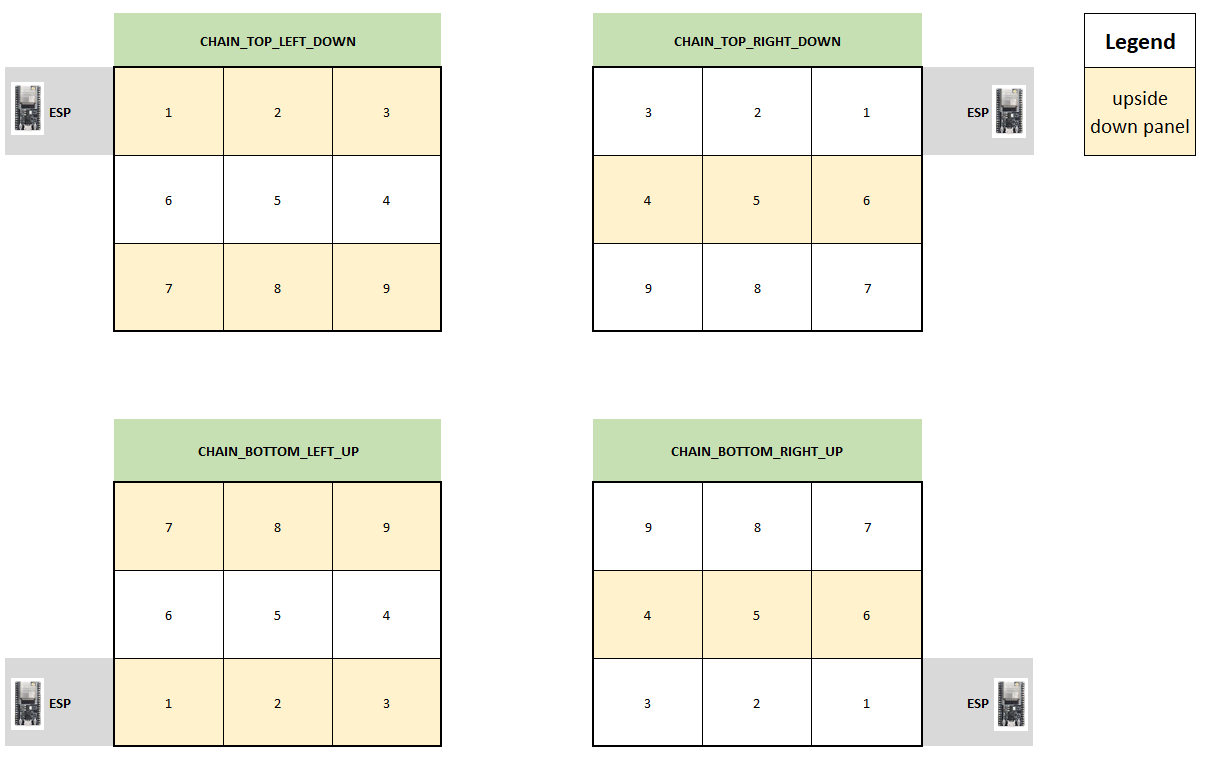 + 3. In your Arduino sketch, use the 'VirtualMatrixPanel' class instance (virtualDisp) to draw to the display (i.e. drawPixel), instead of the underling MatrixPanel_I2S_DMA class instance (dma_display). diff --git a/examples/ChainedPanels/VirtualMatrixPanel.odp b/examples/ChainedPanels/VirtualMatrixPanel.odp Binary files differdeleted file mode 100644 index 4e3a066..0000000 --- a/examples/ChainedPanels/VirtualMatrixPanel.odp +++ /dev/null diff --git a/examples/ChainedPanels/VirtualMatrixPanel.pdf b/examples/ChainedPanels/VirtualMatrixPanel.pdf Binary files differdeleted file mode 100644 index db63112..0000000 --- a/examples/ChainedPanels/VirtualMatrixPanel.pdf +++ /dev/null diff --git a/examples/ChainedPanelsAuroraDemo/ChainedPanelsAuroraDemo.ino b/examples/ChainedPanelsAuroraDemo/ChainedPanelsAuroraDemo.ino index db6d4c9..f1cd7de 100644 --- a/examples/ChainedPanelsAuroraDemo/ChainedPanelsAuroraDemo.ino +++ b/examples/ChainedPanelsAuroraDemo/ChainedPanelsAuroraDemo.ino @@ -117,7 +117,7 @@ void setup() matrix->setBrightness8(96); // range is 0-255, 0 - 0%, 255 - 100% // create VirtualDisplay object based on our newly created dma_display object - virtualDisp = new VirtualMatrixPanel((*matrix), NUM_ROWS, NUM_COLS, PANEL_RES_X, PANEL_RES_Y, SERPENT, TOPDOWN); + virtualDisp = new VirtualMatrixPanel((*matrix), NUM_ROWS, NUM_COLS, PANEL_RES_X, PANEL_RES_Y, CHAIN_TOP_LEFT_DOWN); Serial.println("**************** Starting Aurora Effects Demo ****************"); diff --git a/examples/Four_Scan_Panel/Four_Scan_Panel.ino b/examples/Four_Scan_Panel/Four_Scan_Panel.ino index 856d7e5..5086b62 100644 --- a/examples/Four_Scan_Panel/Four_Scan_Panel.ino +++ b/examples/Four_Scan_Panel/Four_Scan_Panel.ino @@ -91,7 +91,7 @@ delay(500); // create FourScanPanellay object based on our newly created dma_display object - FourScanPanel = new VirtualMatrixPanel((*dma_display), NUM_ROWS, NUM_COLS, PANEL_RES_X, PANEL_RES_Y, SERPENT, TOPDOWN); + FourScanPanel = new VirtualMatrixPanel((*dma_display), NUM_ROWS, NUM_COLS, PANEL_RES_X, PANEL_RES_Y); // THE IMPORTANT BIT BELOW! FourScanPanel->setPhysicalPanelScanRate(FOUR_SCAN_32PX_HIGH); diff --git a/examples/4_HueValueSpectrumDemo/4_HueValueSpectrumDemo.ino b/examples/HueValueSpectrum/HueValueSpectrum.ino index e64d419..897275e 100644 --- a/examples/4_HueValueSpectrumDemo/4_HueValueSpectrumDemo.ino +++ b/examples/HueValueSpectrum/HueValueSpectrum.ino @@ -7,6 +7,10 @@ MatrixPanel_I2S_DMA *dma_display = nullptr; void setup() { + + Serial.begin(112500); + + HUB75_I2S_CFG::i2s_pins _pins={ 25, //R1_PIN, 26, //G1_PIN, @@ -26,8 +30,8 @@ void setup() { HUB75_I2S_CFG mxconfig( PANEL_RES_X, // Module width PANEL_RES_Y, // Module height - PANEL_CHAIN, // chain length - _pins // pin mapping + PANEL_CHAIN //, // chain length + //_pins // pin mapping -- uncomment if providing own custom pin mapping as per above. ); //mxconfig.clkphase = false; //mxconfig.driver = HUB75_I2S_CFG::FM6126A; @@ -40,12 +44,13 @@ void setup() { void loop() { // Canvas loop - float t = (float)(millis()%4000)/4000.f; - float tt = (float)((millis()%16000)/16000.f; + float t = (float) ((millis()%4000)/4000.f); + float tt = (float) ((millis()%16000)/16000.f); - for(int x = 0; x < PANEL_RES_X*PANEL_CHAIN; x++){ + for(int x = 0; x < (PANEL_RES_X*PANEL_CHAIN); x++) + { // calculate the overal shade - float f = ((sin(tt-(float)x/PANEL_RES_Y/32.)*2.f*PI)+1)/2)*255; + float f = (((sin(tt-(float)x/PANEL_RES_Y/32.)*2.f*PI)+1)/2)*255; // calculate hue spectrum into rgb float r = max(min(cosf(2.f*PI*(t+((float)x/PANEL_RES_Y+0.f)/3.f))+0.5f,1.f),0.f); float g = max(min(cosf(2.f*PI*(t+((float)x/PANEL_RES_Y+1.f)/3.f))+0.5f,1.f),0.f); diff --git a/examples/PIO_TestPatterns/src/main.cpp b/examples/PIO_TestPatterns/src/main.cpp index 40d077e..4e0edb1 100644 --- a/examples/PIO_TestPatterns/src/main.cpp +++ b/examples/PIO_TestPatterns/src/main.cpp @@ -116,7 +116,7 @@ void setup(){ chain->begin(); chain->setBrightness8(255); // create VirtualDisplay object based on our newly created dma_display object - matrix = new VirtualMatrixPanel((*chain), NUM_ROWS, NUM_COLS, PANEL_WIDTH, PANEL_HEIGHT, SERPENT, TOPDOWN); + matrix = new VirtualMatrixPanel((*chain), NUM_ROWS, NUM_COLS, PANEL_WIDTH, PANEL_HEIGHT, CHAIN_TOP_LEFT_DOWN); #endif ledbuff = (CRGB *)malloc(NUM_LEDS * sizeof(CRGB)); // allocate buffer for some tests diff --git a/examples/esp-idf/.gitignore b/examples/esp-idf/.gitignore new file mode 100644 index 0000000..3abcf2c --- /dev/null +++ b/examples/esp-idf/.gitignore @@ -0,0 +1,12 @@ +# ESP-IDF default build directory +build + +# Temporary files +*.swp + +# lock files for examples and components +dependencies.lock + +sdkconfig* +# Unignore sdkconfig.defaults +!sdkconfig.defaults diff --git a/examples/esp-idf/with-gfx/CMakeLists.txt b/examples/esp-idf/with-gfx/CMakeLists.txt new file mode 100644 index 0000000..192eccb --- /dev/null +++ b/examples/esp-idf/with-gfx/CMakeLists.txt @@ -0,0 +1,10 @@ +# This is a boilerplate top-level project CMakeLists.txt file. +# This is the primary file which CMake uses to learn how to build the project. +# +# Most of the important stuff happens in the 'main' directory. +# +# See https://docs.espressif.com/projects/esp-idf/en/latest/esp32/api-guides/build-system.html#example-project for more details. +cmake_minimum_required(VERSION 3.5) + +include($ENV{IDF_PATH}/tools/cmake/project.cmake) +project(with-gfx) diff --git a/examples/esp-idf/with-gfx/README.md b/examples/esp-idf/with-gfx/README.md new file mode 100644 index 0000000..07565f9 --- /dev/null +++ b/examples/esp-idf/with-gfx/README.md @@ -0,0 +1,17 @@ +# ESP-IDF Example With Adafruit GFX Library + +This folder contains example code for using this library with `esp-idf` and the [Adafruit GFX library](https://github.com/adafruit/Adafruit-GFX-Library). + +First, follow the [Getting Started Guide for ESP-IDF](https://docs.espressif.com/projects/esp-idf/en/latest/esp32/get-started/index.html) to install ESP-IDF onto your computer. + +When you are ready to start your first project with this library, follow folow these steps: + + 1. Copy the files in this folder (and sub folders) into a new directory for your project. + 1. Clone the required repositories: + ``` + git clone https://github.com/mrfaptastic/ESP32-HUB75-MatrixPanel-DMA.git components/ESP32-HUB75-MatrixPanel-I2S-DMA + git clone https://github.com/adafruit/Adafruit-GFX-Library.git components/Adafruit-GFX-Library + git clone https://github.com/adafruit/Adafruit_BusIO.git components/Adafruit_BusIO + git clone https://github.com/espressif/arduino-esp32.git components/arduino + ``` + 1. Build your project: `idf.py build` diff --git a/examples/esp-idf/with-gfx/components/.gitignore b/examples/esp-idf/with-gfx/components/.gitignore new file mode 100644 index 0000000..5e7d273 --- /dev/null +++ b/examples/esp-idf/with-gfx/components/.gitignore @@ -0,0 +1,4 @@ +# Ignore everything in this directory +* +# Except this file +!.gitignore diff --git a/examples/esp-idf/with-gfx/main/CMakeLists.txt b/examples/esp-idf/with-gfx/main/CMakeLists.txt new file mode 100644 index 0000000..16901f0 --- /dev/null +++ b/examples/esp-idf/with-gfx/main/CMakeLists.txt @@ -0,0 +1,5 @@ +idf_component_register( + SRC_DIRS "." ${SRCDIRS} + INCLUDE_DIRS ${INCLUDEDIRS} + REQUIRES ESP32-HUB75-MatrixPanel-I2S-DMA + ) diff --git a/examples/esp-idf/with-gfx/main/main.cpp b/examples/esp-idf/with-gfx/main/main.cpp new file mode 100644 index 0000000..7672dc5 --- /dev/null +++ b/examples/esp-idf/with-gfx/main/main.cpp @@ -0,0 +1,14 @@ +#include "ESP32-HUB75-MatrixPanel-I2S-DMA.h" + +MatrixPanel_I2S_DMA *dma_display = nullptr; + +extern "C" void app_main() { + HUB75_I2S_CFG mxconfig(/* width = */ 64, /* height = */ 64, /* chain = */ 1); + + dma_display = new MatrixPanel_I2S_DMA(mxconfig); + dma_display->begin(); + dma_display->setBrightness8(80); + dma_display->clearScreen(); + // `println` is only available when the Adafruit GFX library is used. + dma_display->println("Test message"); +} diff --git a/examples/esp-idf/with-gfx/sdkconfig.defaults b/examples/esp-idf/with-gfx/sdkconfig.defaults new file mode 100644 index 0000000..879d223 --- /dev/null +++ b/examples/esp-idf/with-gfx/sdkconfig.defaults @@ -0,0 +1 @@ +CONFIG_FREERTOS_HZ=1000 diff --git a/examples/esp-idf/without-gfx/CMakeLists.txt b/examples/esp-idf/without-gfx/CMakeLists.txt new file mode 100644 index 0000000..9fbb7f4 --- /dev/null +++ b/examples/esp-idf/without-gfx/CMakeLists.txt @@ -0,0 +1,10 @@ +# This is a boilerplate top-level project CMakeLists.txt file. +# This is the primary file which CMake uses to learn how to build the project. +# +# Most of the important stuff happens in the 'main' directory. +# +# See https://docs.espressif.com/projects/esp-idf/en/latest/esp32/api-guides/build-system.html#example-project for more details. +cmake_minimum_required(VERSION 3.5) + +include($ENV{IDF_PATH}/tools/cmake/project.cmake) +project(without-gfx) diff --git a/examples/esp-idf/without-gfx/README.md b/examples/esp-idf/without-gfx/README.md new file mode 100644 index 0000000..f428b23 --- /dev/null +++ b/examples/esp-idf/without-gfx/README.md @@ -0,0 +1,14 @@ +# ESP-IDF Example Without Adafruit GFX Library + +This folder contains example code for using this library with `esp-idf`. + +First, follow the [Getting Started Guide for ESP-IDF](https://docs.espressif.com/projects/esp-idf/en/latest/esp32/get-started/index.html) to install ESP-IDF onto your computer. + +When you are ready to start your first project with this library, follow folow these steps: + + 1. Copy the files in this folder (and sub folders) into a new directory for your project. + 1. Clone the required repositories: + ``` + git clone https://github.com/mrfaptastic/ESP32-HUB75-MatrixPanel-DMA.git components/ESP32-HUB75-MatrixPanel-I2S-DMA + ``` + 1. Build your project: `idf.py build` diff --git a/examples/esp-idf/without-gfx/components/.gitignore b/examples/esp-idf/without-gfx/components/.gitignore new file mode 100644 index 0000000..5e7d273 --- /dev/null +++ b/examples/esp-idf/without-gfx/components/.gitignore @@ -0,0 +1,4 @@ +# Ignore everything in this directory +* +# Except this file +!.gitignore diff --git a/examples/esp-idf/without-gfx/main/CMakeLists.txt b/examples/esp-idf/without-gfx/main/CMakeLists.txt new file mode 100644 index 0000000..16901f0 --- /dev/null +++ b/examples/esp-idf/without-gfx/main/CMakeLists.txt @@ -0,0 +1,5 @@ +idf_component_register( + SRC_DIRS "." ${SRCDIRS} + INCLUDE_DIRS ${INCLUDEDIRS} + REQUIRES ESP32-HUB75-MatrixPanel-I2S-DMA + ) diff --git a/examples/esp-idf/without-gfx/main/main.cpp b/examples/esp-idf/without-gfx/main/main.cpp new file mode 100644 index 0000000..c44b49c --- /dev/null +++ b/examples/esp-idf/without-gfx/main/main.cpp @@ -0,0 +1,12 @@ +#include "ESP32-HUB75-MatrixPanel-I2S-DMA.h" + +MatrixPanel_I2S_DMA *dma_display = nullptr; + +extern "C" void app_main() { + HUB75_I2S_CFG mxconfig(/* width = */ 64, /* height = */ 64, /* chain = */ 1); + + dma_display = new MatrixPanel_I2S_DMA(mxconfig); + dma_display->begin(); + dma_display->setBrightness8(80); + dma_display->clearScreen(); +} diff --git a/examples/esp-idf/without-gfx/sdkconfig.defaults b/examples/esp-idf/without-gfx/sdkconfig.defaults new file mode 100644 index 0000000..57aec4a --- /dev/null +++ b/examples/esp-idf/without-gfx/sdkconfig.defaults @@ -0,0 +1 @@ +CONFIG_ESP32_HUB75_USE_GFX=n |


