
diff options
| author | mrcodetastic <12006953+mrcodetastic@users.noreply.github.com> | 2024-07-28 22:00:45 +0100 |
|---|---|---|
| committer | mrcodetastic <12006953+mrcodetastic@users.noreply.github.com> | 2024-07-28 22:00:45 +0100 |
| commit | f2634319ab7ebfe22fc6d2ebabcdd27879f3667e (patch) | |
| tree | d8834f64f0dc4349bf34cf29a6831a12063b1435 /examples/ChainedPanels | |
| parent | aa28e2a93baaf90083b2d556c0ac80602d9940aa (diff) | |
Clean-up and fix some examples
Diffstat (limited to 'examples/ChainedPanels')
| -rw-r--r-- | examples/ChainedPanels/ChainedPanels.ino | 169 | ||||
| -rw-r--r-- | examples/ChainedPanels/README.md | 51 |
2 files changed, 0 insertions, 220 deletions
diff --git a/examples/ChainedPanels/ChainedPanels.ino b/examples/ChainedPanels/ChainedPanels.ino deleted file mode 100644 index 1343d9b..0000000 --- a/examples/ChainedPanels/ChainedPanels.ino +++ /dev/null @@ -1,169 +0,0 @@ -/****************************************************************************** - ------------------------------------------------------------------------- - Steps to create a virtual display made up of a chain of panels in a grid - ------------------------------------------------------------------------- - - Read the documentation! - https://github.com/mrfaptastic/ESP32-HUB75-MatrixPanel-DMA/tree/master/examples/ChainedPanels - - tl/dr: - - - Set values for NUM_ROWS, NUM_COLS, PANEL_RES_X, PANEL_RES_Y, PANEL_CHAIN_TYPE. - - - Other than where the matrix is defined and matrix.begin in the setup, you - should now be using the virtual display for everything (drawing pixels, writing text etc). - You can do a find and replace of all calls if it's an existing sketch - (just make sure you don't replace the definition and the matrix.begin) - - - If the sketch makes use of MATRIX_HEIGHT or MATRIX_WIDTH, these will need to be - replaced with the width and height of your virtual screen. - Either make new defines and use that, or you can use virtualDisp.width() or .height() - -*****************************************************************************/ -// 1) Include key virtual display library - #include <ESP32-VirtualMatrixPanel-I2S-DMA.h> - -// 2) Set configuration - #define PANEL_RES_X 64 // Number of pixels wide of each INDIVIDUAL panel module. - #define PANEL_RES_Y 32 // Number of pixels tall of each INDIVIDUAL panel module. - - #define NUM_ROWS 2 // Number of rows of chained INDIVIDUAL PANELS - #define NUM_COLS 2 // Number of INDIVIDUAL PANELS per ROW - #define PANEL_CHAIN NUM_ROWS*NUM_COLS // total number of panels chained one to another - - /* Configure the serpetine chaining approach. Options are: - CHAIN_TOP_LEFT_DOWN - CHAIN_TOP_RIGHT_DOWN - CHAIN_BOTTOM_LEFT_UP - CHAIN_BOTTOM_RIGHT_UP - - The location (i.e. 'TOP_LEFT', 'BOTTOM_RIGHT') etc. refers to the starting point where - the ESP32 is located, and how the chain of panels will 'roll out' from there. - - In this example we're using 'CHAIN_BOTTOM_LEFT_UP' which would look like this in the real world: - - Chain of 4 x 64x32 panels with the ESP at the BOTTOM_LEFT: - - +---------+---------+ - | 4 | 3 | - | | | - +---------+---------+ - | 1 | 2 | - | (ESP) | | - +---------+---------+ - - */ - #define VIRTUAL_MATRIX_CHAIN_TYPE CHAIN_BOTTOM_LEFT_UP - -// 3) Create the runtime objects to use - - // placeholder for the matrix object - MatrixPanel_I2S_DMA *dma_display = nullptr; - - // placeholder for the virtual display object - VirtualMatrixPanel *virtualDisp = nullptr; - - -/****************************************************************************** - * Setup! - ******************************************************************************/ -void setup() { - - delay(2000); - Serial.begin(115200); - Serial.println(""); Serial.println(""); Serial.println(""); - Serial.println("*****************************************************"); - Serial.println(" HELLO !"); - Serial.println("*****************************************************"); - - - /****************************************************************************** - * Create physical DMA panel class AND virtual (chained) display class. - ******************************************************************************/ - - /* - The configuration for MatrixPanel_I2S_DMA object is held in HUB75_I2S_CFG structure, - All options has it's predefined default values. So we can create a new structure and redefine only the options we need - - Please refer to the '2_PatternPlasma.ino' example for detailed example of how to use the MatrixPanel_I2S_DMA configuration - */ - - HUB75_I2S_CFG mxconfig( - PANEL_RES_X, // module width - PANEL_RES_Y, // module height - PANEL_CHAIN // chain length - ); - - //mxconfig.driver = HUB75_I2S_CFG::FM6126A; // in case that we use panels based on FM6126A chip, we can set it here before creating MatrixPanel_I2S_DMA object - - // Sanity checks - if (NUM_ROWS <= 1) { - Serial.println(F("There is no reason to use the VirtualDisplay class for a single horizontal chain and row!")); - } - - // OK, now we can create our matrix object - dma_display = new MatrixPanel_I2S_DMA(mxconfig); - - // let's adjust default brightness to about 75% - dma_display->setBrightness8(192); // range is 0-255, 0 - 0%, 255 - 100% - - // Allocate memory and start DMA display - if( not dma_display->begin() ) - Serial.println("****** !KABOOM! I2S memory allocation failed ***********"); - - // create VirtualDisplay object based on our newly created dma_display object - virtualDisp = new VirtualMatrixPanel((*dma_display), NUM_ROWS, NUM_COLS, PANEL_RES_X, PANEL_RES_Y, VIRTUAL_MATRIX_CHAIN_TYPE); - - // So far so good, so continue - virtualDisp->fillScreen(virtualDisp->color444(0, 0, 0)); - virtualDisp->drawDisplayTest(); // draw text numbering on each screen to check connectivity - - // delay(1000); - - Serial.println("Chain of 4x 64x32 panels for this example:"); - Serial.println("+---------+---------+"); - Serial.println("| 4 | 3 |"); - Serial.println("| | |"); - Serial.println("+---------+---------+"); - Serial.println("| 1 | 2 |"); - Serial.println("| (ESP32) | |"); - Serial.println("+---------+---------+"); - - // draw blue text - virtualDisp->setFont(&FreeSansBold12pt7b); - virtualDisp->setTextColor(virtualDisp->color565(0, 0, 255)); - virtualDisp->setTextSize(3); - virtualDisp->setCursor(0, virtualDisp->height()- ((virtualDisp->height()-45)/2)); - virtualDisp->print("ABCD"); - - // Red text inside red rect (2 pix in from edge) - virtualDisp->drawRect(1,1, virtualDisp->width()-2, virtualDisp->height()-2, virtualDisp->color565(255,0,0)); - - // White line from top left to bottom right - virtualDisp->drawLine(0,0, virtualDisp->width()-1, virtualDisp->height()-1, virtualDisp->color565(255,255,255)); - - virtualDisp->drawDisplayTest(); // re draw text numbering on each screen to check connectivity - -} - -void loop() { - - -} // end loop - - -/***************************************************************************** - - Thanks to: - - * Brian Lough for the original example as raised in this issue: - https://github.com/mrfaptastic/ESP32-HUB75-MatrixPanel-I2S-DMA/issues/26 - - YouTube: https://www.youtube.com/brianlough - Tindie: https://www.tindie.com/stores/brianlough/ - Twitter: https://twitter.com/witnessmenow - - * Galaxy-Man for the kind donation of panels make/test that this is possible: - https://github.com/Galaxy-Man - -*****************************************************************************/
\ No newline at end of file diff --git a/examples/ChainedPanels/README.md b/examples/ChainedPanels/README.md deleted file mode 100644 index c5aca88..0000000 --- a/examples/ChainedPanels/README.md +++ /dev/null @@ -1,51 +0,0 @@ -## Chained Panels example - Chaining individual LED matrix panels to make a larger panel ## - -This is the PatternPlasma Demo adopted for use with multiple LED Matrix Panel displays arranged in a non standard order (i.e. a grid) to make a bigger display. - - - -### What do we mean by 'non standard order'? ### - -When you link / chain multiple panels together, the ESP32-HUB75-MatrixPanel-I2S-DMA library treats as one wide horizontal panel. This would be a 'standard' (default) order. - -Non-standard order is essentially the creation of a non-horizontal-only display that you can draw to in the same way you would any other display, with VirtualDisplay library looking after the pixel mapping to the physical chained panels. - -For example: You bought four (4) 64x32px panels, and wanted to use them to create a 128x64pixel display. You would use the VirtualMatrixPanel class. - -[Refer to this document](https://github.com/mrfaptastic/ESP32-HUB75-MatrixPanel-DMA/blob/master/doc/VirtualMatrixPanel.pdf) for an explanation and refer to this example on how to use. - - -### Steps to Use ### - -1. [Refer to this document](https://github.com/mrfaptastic/ESP32-HUB75-MatrixPanel-DMA/blob/master/doc/VirtualMatrixPanel.pdf) for an explanation and refer to this example on how to use. - -2. In your Arduino sketch, configure these defines accordingly: -``` -#define PANEL_RES_X 64 // Number of pixels wide of each INDIVIDUAL panel module. -#define PANEL_RES_Y 32 // Number of pixels tall of each INDIVIDUAL panel module. - -#define NUM_ROWS 2 // Number of rows of chained INDIVIDUAL PANELS -#define NUM_COLS 2 // Number of INDIVIDUAL PANELS per ROW - -#define PANEL_CHAIN NUM_ROWS*NUM_COLS // total number of panels chained one to another - -#define VIRTUAL_MATRIX_CHAIN_TYPE <INSERT CHAINING TYPE HERE - Refer to documentation or example> - -``` -VIRTUAL_MATRIX_CHAIN_TYPE's: -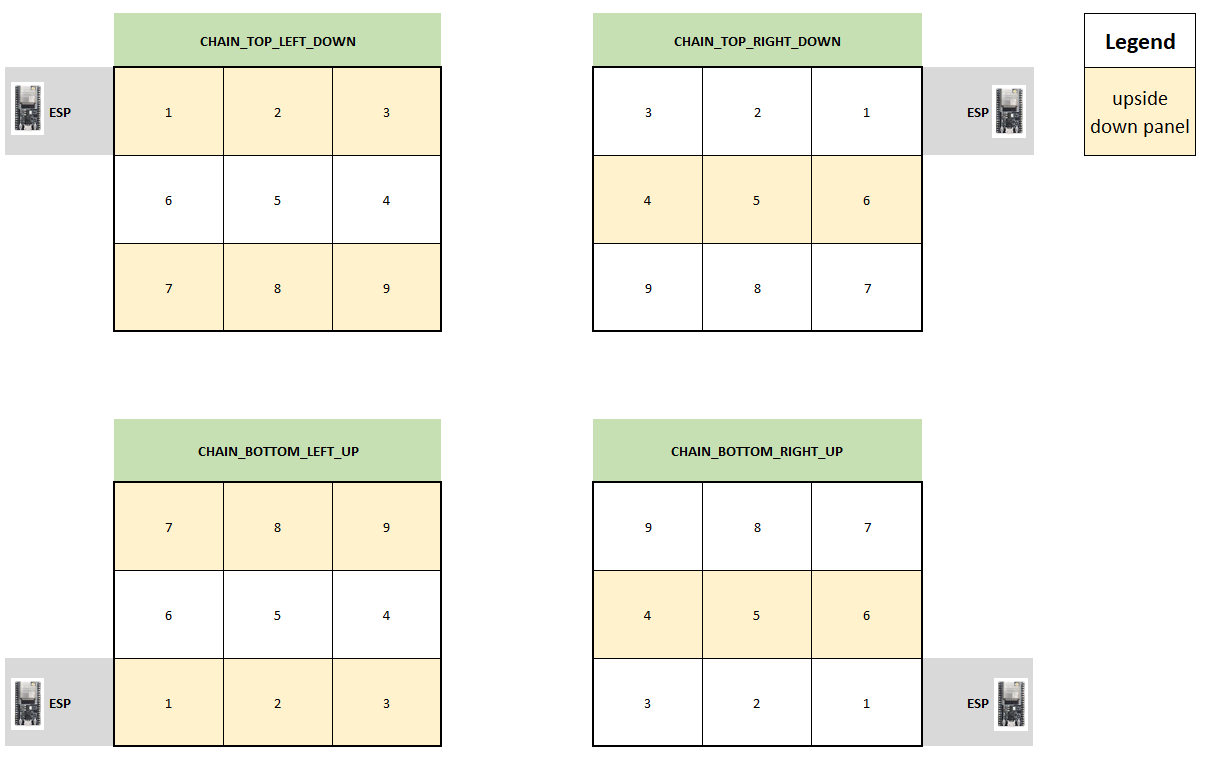 - - -3. In your Arduino sketch, use the 'VirtualMatrixPanel' class instance (virtualDisp) to draw to the display (i.e. drawPixel), instead of the underling MatrixPanel_I2S_DMA class instance (dma_display). - - -#### Thanks to #### -* Brian Lough for the Virtual to Real pixel co-ordinate code. - -YouTube: https://www.youtube.com/brianlough - -Tindie: https://www.tindie.com/stores/brianlough/ - -Twitter: https://twitter.com/witnessmenow - -* Galaxy-Man for the donation of hardware for testing. |